


Hello everyone, what a two weeks of 2026, right?
An X post I wrote about ADHD tricks got a lot of reactions, so I wanted to share my tips about using AI without feeling dumber each day.
Long story short: I position AI beside my brain, not instead of it. Not a crutch, but a growth tool. And, I don’t treat AI as one monolithic tool. I believe each AI has its own “personality” based on how it was trained and what use cases it was designed for.
Some topics work better with GPT-based models, others with Perplexity, Claude, Grok, or NotebookLM. So instead of “one holy model,” I operate with “different tools for different stages.”
In this piece, I’ll walk you through both: my non-negotiable rules for keeping my brain engaged, and which tools I use at each stage of my workflow, from idea discovery to final edit.
Why does this matter? Recent studies show that over-delegating thinking to AI can weaken brain engagement, creativity, and critical thinking over time. An MIT Media Lab study found that the ChatGPT-using group showed the lowest brain activity, and could barely remember what they’d written. As researcher Nataliya Kosmyna put it: “The task was executed, and you could say it was efficient and convenient. But you basically didn’t integrate any of it into your memory networks.”
I refuse to fall into that trap. Here’s how.
1. First Draft Is Mine
This is my most critical rule. Whether it’s an article, project, or presentation, I always produce my own draft first. The backbone of ideas, the core argument, the fundamental flow must come from me before AI enters the picture.
Only then do I bring in ChatGPT and Claude for refinement: clarifying, finding examples, smoothing transitions. This way, ownership of the output stays with me; the model plays a supporting role only.
Why this matters for critical thinking: When you let AI generate from scratch, you skip the cognitive struggle that builds understanding. You get output without insight. By drafting first, I force my brain to do the hard work, and that’s where real learning happens.
2. Research: No Unconditional Trust in Any Model
My research equation is simple:
What I find = Not verified information, but candidate information.
Regardless of which model I use, I don’t accept any piece of information, any link, any claim without verifying it through a second source. You’d be surprised how often “legitimate” links turn out to be broken or misleading.
Here’s my source research workflow:
Idea Discovery
Before diving into sources, I check what people are actually curious about. I browse my own readings, scroll Reddit to see what questions come up, and use Grok to explore what’s being discussed on X.
I use Grok specifically for tracking raw ideas within X (Twitter). It catches the raw pulse of conversations. My goal here isn’t finding “absolute truth”, it’s understanding who’s saying what, how they’re framing it, which arguments and biases are circulating.I also use it for controversial or political topics since it has no guardrails. But I treat everything from X as opinion, not truth.
To save time, I automate my daily source hunting. Zapier and Make with AI steps help me track newsletters and Twitter accounts I follow. Summaries, classifications, and alerts come to me automatically.
Source Research
Perplexity is my starting point. For any topic, I pull up blog posts, YouTube videos, academic papers, and reports. Its speed, citation quality, and low hallucination rate make it ideal for this initial panoramic view. It’s also my go-to for fact-checking and for finding whether my own ideas exist elsewhere, or tracking down where I remember a data point from.
For academic research specifically, I use Consensus to find peer-reviewed papers. Scite is awesome for finding credible papers and seeing how different research articles cite each other. It helps me understand the context of a topic and figure out which sources are actually influential. Way faster than sifting through Google Scholar manually.
Claude comes in for reports and when I need accurate, well-reasoned information. It’s the AI I trust most when it comes to responsible AI policy and nuanced topics. But still: machine is machine. Final check is always mine.
Even with low-hallucination tools, I do my own fact-checking. It just takes less time than with ChatGPT.
Typeset.io is a lifesaver when I need to format papers into the right citation style or journal template. Instead of stressing about whether my references are in APA, MLA, or Chicago style, I plug my text in and Typeset takes care of the details. But I always do a final human review. Automation handles formatting, not accuracy.
Working With Sources
NotebookLM is where I take those URLs and work with them. Rather than reading each source end-to-end, I stay grounded in my own materials. I check if the sources contain what I need, or use them to challenge my arguments. I can talk to my articles, ask questions, and get answers with direct references.
For data analysis, I upload datasets and have conversations with the data to find patterns and insights.
It helps me develop the brain map or first draft I’ve already sketched. Connections between texts, themes, and section ideas emerge naturally. I can see which sources are actually meaningful before diving into deep reading.
Gemini comes in when I want alternative perspectives and different frameworks. Its research filter is still weak, so I don’t use it as my main engine.
ChatGPT is where I encounter the most hallucinations at this stage, especially regarding source accuracy. That’s why I position it not as a “source engine” but on the reasoning and draft production side.
Whichever tool I use, the final decision always passes through the same checkpoint: I manually verify every piece of information, read the actual text, and form my own conclusions. Only then does it graduate to “knowledge” status.
3. Making AI Play Devil’s Advocate
This is my favorite way to use AI. During argument development, I deliberately put ChatGPT and Claude on the opposing side. Why these two? Claude is the AI I trust most for responsible, nuanced reasoning. ChatGPT, with its massive user base, has been exposed to more perspectives and debate patterns than any other model.
My go-to prompts:
“Give me three reasons why this assumption might be flawed, without agreeing with any part of it.”
“Act as a skeptical editor. What parts of this argument wouldn’t survive peer review?”
“Challenge every point I make, focusing only on potential errors, biases, or alternative interpretations.”
“List the weakest points in my argument and explain why they don’t hold up.”
These questions transform the model from a validating assistant into a sparring partner that stress-tests my arguments.
NotebookLM also helps me go deeper on topics. I upload articles and have back-and-forth conversations to understand nuances I might miss by just reading. And when I want passive learning, I use the Audio Overview feature to generate a podcast-style discussion about my sources. I listen while commuting or walking.
I know, ChatGPT tends to agree with everything by default. That’s why I have a custom system prompt that forces it to push back instead of validating.
My approach is simple: I don’t ask AI “Am I right?” I ask it “Where might I be wrong?”
4. Planning: Analog Backbone, Digital Support
I deliberately stay analog-heavy when it comes to planning. All my planning happens in my notebook first. Project flows, article skeletons, conceptual relationships: everything is born on paper. This is my “slow thinking” space, where I can erase and rewrite, draw and connect with arrows, keeping intuition in play.
Then the digital layers come in:
I upload my sources to NotebookLM and extract mind map ideas and section breakdowns.
I ask ChatGPT & Claude to generate outlines: headings, subheadings, transition suggestions.
I transfer these to Miro, and when needed, use Napkin for freer diagrams to visualize the big picture.
But here’s my critical red line: Even if I create an outline with AI, I don’t proceed by trusting it blindly. I always rewrite it by hand, modify it, restructure it to create the final version.
Training Programs
When I create training materials for projects or conferences, NotebookLM is invaluable. I upload the content and use its Quiz and Flashcard features to generate learning materials. It saves hours of manual work and ensures the questions are grounded in the actual source material.
P.S. Visualization: For presentations, I use Skywork and Gamma to turn outlines into slides quickly. For visuals, Midjourney and Ideogram handle marketing images, while Canva AI is great for quick social graphics. Gemini occasionally helps with visual brainstorming too. But the context, the emphasis points, the rhythm of the story: that’s still my brain deciding.
From the outside, this might look like “doing the same work twice.” In my view:
First round: I sketch the backbone.
Second round: AI offers alternatives.
Third round: I decide, merge, and finalize.
I use the speed, but I don’t delegate the responsibility of thinking.
5. Writing and Editing Process
Once the draft is complete, roles shift. I put AI in the editor’s chair.
Grammarly handles the first pass: proofreading, catching grammar mistakes, awkward phrasing, and unclear sentences. It’s especially useful for academic writing since it helps maintain a formal tone and avoids careless errors.
Claude is my go-to for deeper editing on casual writing. It’s great at identifying unnecessarily repeated arguments and suggesting ways to tighten the flow.
For both tools, I ask them to:
Flag grammar and spelling errors
Identify repeated arguments
Offer suggestions to simplify convoluted sentences
Provide feedback on reference clarity and placement
I don’t accept all suggestions without question. I select while preserving my own style, tone, and intent. The final word is still mine.
6. Handwriting: Don’t Forget the Map
I pay special attention to taking notes by hand. It might seem archaic in the digital age, but there’s scientific reasoning behind it.
A 2024 study published in Frontiers in Psychology showed that handwriting produces stronger connectivity in brain waves associated with memory formation compared to typing. Beyond motor areas, broader brain regions linked to learning are also activated. As neuroscientist Ramesh Balasubramaniam noted: “There’s actually some very important things going on during the embodied experience of writing by hand. It has important cognitive benefits.”
This makes working with a notebook not nostalgic, but neurobiologically sound.
7. The Toolbox: Different AIs, Different Personalities
Instead of “one super model,” I operate with “different tools for different contexts.” I choose the tool based on the question. So here’s how I use AI daily without outsourcing my thinking.
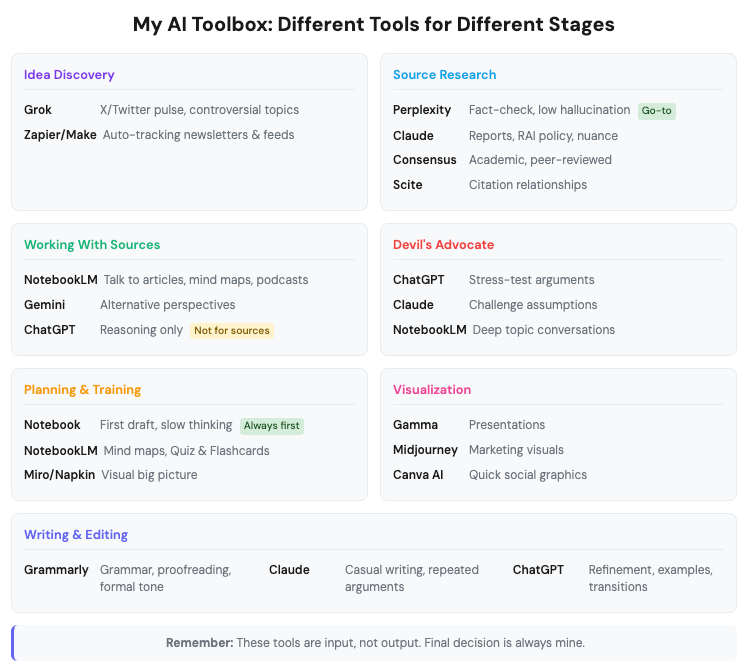
AI beside my brain, not instead of it. That’s it.
What’s your strategy?
💬 Let’s Connect:
🔗 LinkedIn: [linkedin.com/in/nesibe-kiris]
🐦 Twitter/X: [@nesibekiris]
📸 Instagram: [@nesibekiris]
🔔 New here? for weekly updates on AI governance, ethics, and policy! no hype, just what matters.
This was awesome and I leave with a lot of learnings, thanks!
This was useful - thanks Nesibe!